
Reading a Nutrition Label Without Getting Confused
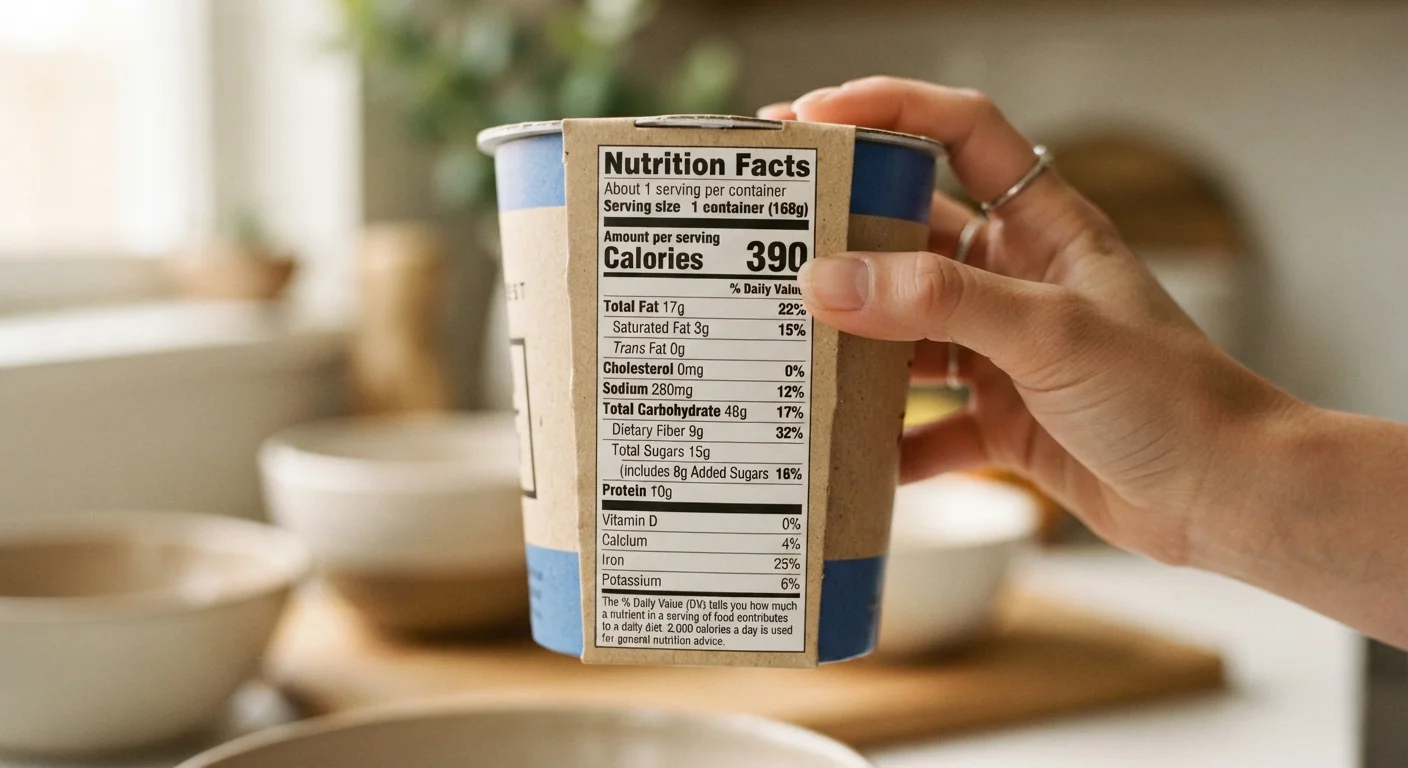
Photo credit: InsightsGrove.com | Discover Joy In Reading
Nutrition labels carry a lot of information. This guide breaks down what each section means and how to use it when choosing between budget options.
Key Takeaways
- Serving size is the foundation of every other number on the label - always check it first.
- The % Daily Value column tells you whether a nutrient amount is high or low relative to daily needs.
- Sodium, added sugars, and saturated fat are worth monitoring even in budget-friendly packaged foods.
- Ingredients are listed by weight - the first few tell you the most about what you're actually eating.
- Comparing labels per serving - not per package - reveals the true nutritional difference between two products.
Why Nutrition Labels Matter for Budget Shoppers
Packaged food is a staple of budget grocery shopping - it's shelf-stable, affordable, and widely available. But without knowing how to read a Nutrition Facts panel, it's easy to overpay in nutritional value while thinking you're saving money. Two products at the same price point can differ substantially in fiber, sodium, or protein per serving.
The FDA's standardized Nutrition Facts format, updated in 2020 to improve clarity, gives every shopper the same information. The challenge isn't access - it's knowing what to look at first and what to skip.
Labels Are General Information, Not Medical Advice
Nutrition labels are designed for the general healthy adult population. If you have a medical condition, food allergy, or specific dietary requirement, the %DV figures on a standard label may not reflect your individual needs. Always consult a registered dietitian or healthcare provider for guidance tailored to your situation.
This guide walks through the label section by section so you can make faster, more confident comparisons in the grocery aisle. If you're also trying to understand broader patterns in affordable eating, our budget nutrition overview covers the foundational principles.
What you will need
Step-by-Step: Decoding the Label
The steps below follow the physical layout of a standard US Nutrition Facts panel - top to bottom. Working through them in order prevents the common mistake of fixating on calories while ignoring serving size, or comparing %DV figures without noticing that two products use different serving sizes.
Watch Out for Misleading Serving Sizes
A package that looks like a single serving sometimes lists two or more servings on the label. Eating the whole container without checking means you could be consuming double or triple the calories and sodium shown. Always confirm the number of servings per container before evaluating any other number.
Find the Serving Size and Number of Servings
At the very top of any Nutrition Facts panel you'll see Serving Size (e.g., "2/3 cup" or "28g") and Servings Per Container. Every calorie count, gram, and percentage on the label is based on one serving - not the whole package.
If a bag of chips lists 150 calories per serving but contains 3 servings, eating the bag means consuming 450 calories. This single step prevents the most common label-reading mistake.
Read the Calorie Count in Context
Calories tell you how much energy one serving provides. This number matters most when multiplied by how many servings you'll actually consume. Neither high nor low calorie counts are inherently good or bad - context depends on your overall dietary pattern and activity level, which vary person to person.
For general reference, public health bodies such as the USDA provide guidance on average daily calorie ranges, but these are population-level estimates, not individual prescriptions.
Examine the Nutrients to Limit
The label groups certain nutrients under an implicit "limit these" category based on public health guidance. Key ones include:
- Saturated Fat - associated with cardiovascular risk at high intakes
- Sodium - high intake is linked to elevated blood pressure in population studies
- Added Sugars - distinguished from naturally occurring sugars; high intake is a concern in many dietary guidelines
Check the % Daily Value (%DV) column for each. A %DV above 20% per serving is generally considered high.
Look at Nutrients to Get Enough Of
The lower section of the panel highlights nutrients that many Americans fall short on. These typically include:
- Dietary Fiber - supports digestive health; a %DV of 20% or more is a good sign
- Vitamin D, Calcium, Iron, Potassium - listed because deficiency is common in the general population
- Protein - listed in grams but without a %DV; useful for comparing between products
When two budget options cost the same, using these figures to pick the more nutrient-dense one is a straightforward, practical strategy. For more context on prioritizing nutrients affordably, see our guide to eating well on a tight budget.
Scan the Ingredient List
Ingredients appear in descending order by weight. If sugar, a refined grain, or a type of fat appears in the first two or three positions, that ingredient makes up a significant portion of the product.
Watch for added sugars listed under multiple names - corn syrup, dextrose, maltose, and cane juice are all forms of added sugar. Each appears separately on the ingredient list, but they all count toward the "Added Sugars" line in the Nutrition Facts panel.
Compare Products Using the Same Reference Point
When choosing between two options - say, a store brand versus a national brand - align your comparison by serving size. If the servings differ, scale the numbers: divide by the label's serving weight and multiply by the serving weight you want to compare.
Pair this with unit pricing at the shelf to get a complete picture of value. Unit pricing reveals cost per gram or ounce, while the nutrition label reveals quality per gram - used together, they make budget grocery decisions much more informed.
Use the 5/20 Rule for Quick Comparisons
A %DV of 5% or less is generally considered low for a nutrient; 20% or more is considered high. This rule, recognized by the FDA, lets you scan labels quickly without doing any math. Use it to spot high-sodium or high-saturated-fat products at a glance, especially when comparing store brands.
Once you're comfortable reading individual labels, you'll find that comparing products becomes fast and intuitive - typically 30 seconds per comparison. For a look at what happens when budget eating strategies go too far, see common pitfalls that undermine budget nutrition.

Author
Health & Wellness Editorial Team
Health & Wellness Editorial Team is the collective byline for our editorial team and contributor network. Articles published under this byline or an editorial pen name are researched, written, and reviewed according to our editorial standards for clarity, consistency, and independence before publication.
View all articles →